
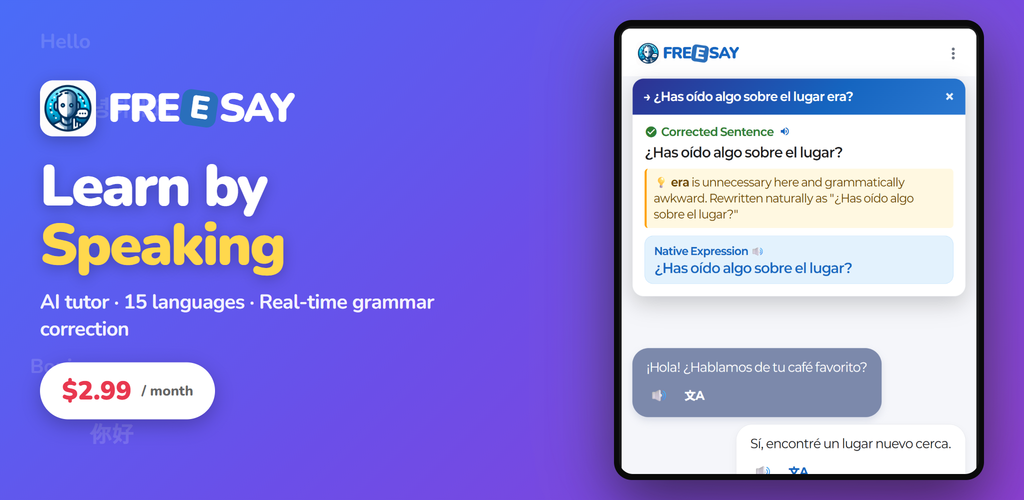

About FreeSay
FreeSay is a pronunciation correction app that helps you speak again when conversation stalls. The official site states it is for beginner to intermediate adult learners who know some vocabulary and grammar but struggle to form the next sentence in real conversations. The source does not disclose whether access is free or paid, but it mentions a monthly subscription with pricing varying by country and app store. FreeSay offers 4 AI characters to practice with, word-level feedback, and AI guidance. It is designed to let you speak directly rather than having the AI speak for you.
Quick facts
| Feature | Details |
|---|---|
| Pricing | Monthly subscription; price varies by country and app store |
| Free version limits | Not disclosed on the official site |
| Account required | Not disclosed on the official site |
| Supported platforms | Android (Google Play), iOS (App Store) |
| API | Not disclosed on the official site |
| Supported languages | 15 learning languages (e.g., English, Korean, Spanish, Japanese, French, Arabic, Hindi, Chinese, German, Russian, Italian, Portuguese, Polish, Vietnamese, Turkish); 47 native input languages |
| AI characters | 4 characters: Emma, Jeongha, Daejun, James |
| Pronunciation evaluation | Word-level feedback with AI correction guidance |
Main features
Pronunciation correction with word-level feedback
FreeSay evaluates your pronunciation word by word and provides AI correction guidance. For example, if you say "three" with a sound close to "f," the app highlights the error and explains how to place your tongue between your teeth to produce the correct "th" sound. The official site does not disclose how many pronunciation evaluations are included per subscription.
4 AI characters for conversation practice
You can choose from 4 AI characters—Emma, Jeongha, Daejun, and James—to practice conversations in scenarios like travel, business, and daily life. The characters respond to your speech and keep the dialogue going. The official site does not disclose whether characters have distinct personalities or accents.
Native language input for stalled conversations
When you get stuck during a conversation, you can type in your native language (one of 47 supported) and FreeSay generates a suggested sentence in the learning language. You then speak that sentence aloud to continue the conversation. This feature is designed for moments when you know what you want to say but cannot produce the foreign language sentence.
Multi-language support with 705 possible combinations
FreeSay supports 15 learning languages and 47 native input languages, creating up to 705 language combinations. For example, a Korean speaker can learn Spanish by typing in Korean and receiving Spanish sentences with pronunciation guides. The official site does not disclose whether all combinations are equally supported or if some have limited functionality.
How to use
- Open the FreeSay app on your Android or iOS device. The official site does not disclose whether a sign-up or login is required.
- Choose one of the 4 AI characters (Emma, Jeongha, Daejun, or James) to start a conversation.
- When you get stuck, type your intended message in your native language using the text input field. The app will generate an AI-suggested sentence in the learning language.
- Tap the suggested sentence to hear the native pronunciation, then speak it aloud. The app listens and evaluates your pronunciation word by word.
- The AI character responds, and the conversation continues. You can repeat the process whenever you get stuck again.
Pricing
| Plan | Price | Details |
|---|---|---|
| Monthly subscription | Varies by country and app store | Not disclosed on the official site |
| Annual discount | Not disclosed on the official site | Not disclosed on the official site |
| Free tier | Not disclosed on the official site | Not disclosed on the official site |
| Pronunciation evaluation | Not disclosed on the official site | Separate from conversation usage; remaining evaluations shown in app |
Pros and cons
Pros
- Supports 47 native input languages, making it accessible to speakers of many languages.
- Provides word-level pronunciation feedback with AI correction guidance.
- Offers 4 AI characters for practicing conversations in travel, business, and daily life scenarios.
Cons
- Pricing is not disclosed on the official site; it varies by country and app store.
- The number of pronunciation evaluations included per subscription is not disclosed on the official site.
- The official site does not disclose whether a free version or trial is available.
Who it is for
FreeSay is for beginner to intermediate adult learners who know some vocabulary and grammar but struggle to form the next sentence in real conversations. It is designed for people who get stuck during conversations and need help to continue speaking. The official site specifically mentions hotel front desk scenarios as a use case, suggesting it is useful for travelers and service industry workers.
Who it is not for
FreeSay is not for advanced learners who can already hold fluent conversations without getting stuck. It is also not for people who want a traditional language learning app with structured lessons, quizzes, or progress tracking—the official site emphasizes that it is a "conversation recovery tool" rather than a learning app. Additionally, it is not for users who prefer to have the AI speak for them, as the app requires you to speak aloud.
FreeSay alternatives
ShortFact is an AI-powered fact-checking mobile app for viral short-form videos. Unlike FreeSay, it focuses on verifying claims rather than pronunciation correction. ShortFact offers a free tier with 20 credits and paid subscriptions starting at $4.99/month. It is available on Android with an iOS waitlist.
Nano Banana Pro is an AI image generation and editing platform with 4K resolution and character consistency. It is not a pronunciation tool. It offers a free tier with 20 credits and paid plans starting at $10.49/month. It is designed for creators, designers, and marketers.
Lip Sync AI is a free-to-try online tool that synchronizes lip movements with audio. It supports 5 sync modes and 40+ languages. It offers a free plan with 10 one-time credits and paid subscriptions starting at $8.3/month billed yearly. Unlike FreeSay, it does not focus on pronunciation correction.
Frequently asked questions
Is FreeSay free?
The official site does not disclose whether FreeSay has a free version. It mentions a monthly subscription with pricing that varies by country and app store. You can check the app for current pricing.
Does FreeSay have a free version?
Not disclosed on the official site. The site only mentions a monthly subscription. It does not specify whether a free trial or free tier is available.
Does FreeSay add a watermark?
Not disclosed on the official site. The site does not mention watermarks on any content generated or recorded within the app.
Can I use FreeSay commercially?
Not disclosed on the official site. The site does not specify any commercial licensing terms or usage rights for businesses.
How many languages does FreeSay support?
FreeSay supports 15 learning languages (including English, Korean, Spanish, Japanese, French, Arabic, Hindi, Chinese, German, Russian, Italian, Portuguese, Polish, Vietnamese, and Turkish) and 47 native input languages. This creates up to 705 possible language combinations.
How does FreeSay pronunciation correction work?
FreeSay evaluates your spoken sentences word by word and provides AI correction guidance. For example, it can identify if you pronounced "three" with an "f" sound instead of "th" and explain how to correct it. The official site does not disclose the accuracy or methodology of the evaluation.
FreeSay vs Duolingo or Speak?
The official site positions FreeSay as a "conversation recovery tool" rather than a learning app like Duolingo or Speak. While those apps focus on practice and lessons, FreeSay helps you speak in the moment when you get stuck. It does not offer structured lessons or quizzes.
Can I use FreeSay without an internet connection?
Not disclosed on the official site. The site does not specify whether the app requires an internet connection for its AI features or pronunciation evaluation.
Fact gaps
- The official site does not disclose whether a free version or trial is available.
- The exact monthly subscription price is not disclosed; it varies by country and app store.
- The number of pronunciation evaluations included per subscription is not disclosed.
- The official site does not specify whether an account or login is required.
- The availability of an API is not disclosed.
- The official site does not disclose whether the app works offline.
FreeSay is a pronunciation correction app that helps you speak again when conversation stalls. Explore more trending products on YourFirstApp.
Comments
0